As an Amazon Associate, we earn from qualifying purchases. Some links on this site are affiliate links at no extra cost to you. Our recommendations are based on thorough research and editorial judgment.

10 Best Beat Maker Pads That’ll Boost Your Music Studio Game

You’ll find top beat maker pads range from compact 16-pad controllers like the Donner MIDI Pad with adjustable velocity sensitivity to expansive 64-pad setups such as the Synido, featuring RGB lighting and easy modes for beginners. Options like the Akai MPD218 offer multiple pad banks and software bundles, while the EMP16 adds Bluetooth and OLED displays for versatility. Whether you want portability, customizable pads, or seamless DAW integration, these tools boost creativity and workflow—explore more to discover the perfect fit for your studio.
Key Takeaways
- Choose beat maker pads with velocity-sensitive RGB pads for dynamic playing and visual feedback during music production sessions.
- Prioritize devices with multiple pad banks or 64-pad layouts for extensive sample access and complex beat-making workflows.
- Bluetooth and USB connectivity enhance portability and seamless integration with computers, DAWs, and mobile devices.
- Bundled software like Ableton Live Lite, MPC Beats, or Cubase helps boost creativity and simplifies music production setup.
- Lightweight, compact designs with rechargeable batteries or shoulder bags support flexible studio or live use anywhere.
| Donner MIDI Pad Beat Maker with 16 Pads |  | Best For Beginners | Number of Pads: 16 pads | Pad Sensitivity: Velocity-sensitive silicone pads with adjustable velocity curves | Connectivity Type: USB (class-compliant), MIDI in/out | VIEW LATEST PRICE | Read Our Analysis |
| Akai MPK Mini MK3 USB MIDI Keyboard Controller | 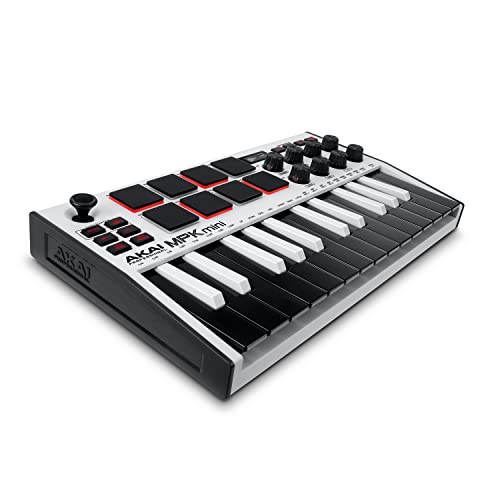 | Most Versatile | Number of Pads: 8 pads | Pad Sensitivity: Velocity-sensitive MPC-style pads | Connectivity Type: USB and sustain pedal input | VIEW LATEST PRICE | Read Our Analysis |
| Synido MIDI Pad Beat Maker Controller (64 Pads) | 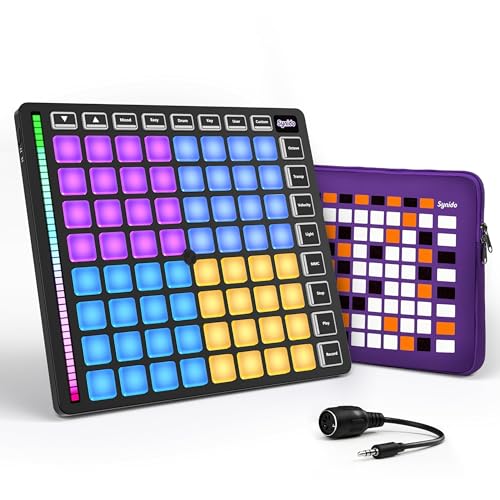 | Best For Live Performance | Number of Pads: 64 pads | Pad Sensitivity: Velocity-sensitive RGB pads with 4 velocity sensitivity levels | Connectivity Type: USB MIDI output (class-compliant), iPhone/iPad via Lightning or USB | VIEW LATEST PRICE | Read Our Analysis |
| Akai MPD218 USB MIDI Controller with Drum Pads | 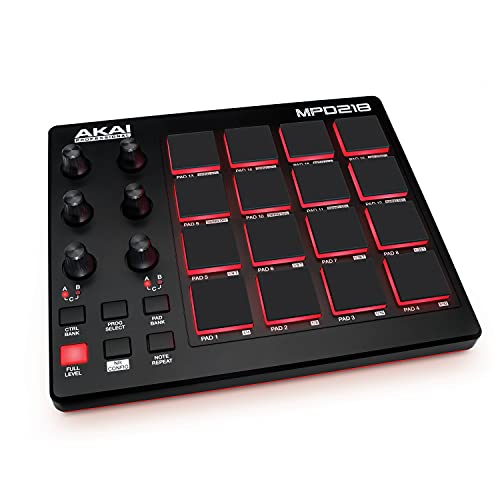 | Budget-Friendly Pick | Number of Pads: 16 pads | Pad Sensitivity: Thick velocity-sensitive MPC pads | Connectivity Type: USB powered | VIEW LATEST PRICE | Read Our Analysis |
| EMP16 MIDI Pad Controller with Bluetooth and OLED | 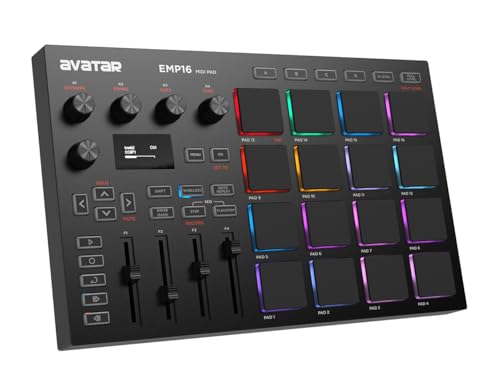 | Best Wireless Option | Number of Pads: 16 pads (expandable to 64) | Pad Sensitivity: Velocity-sensitive pads with 3 velocity curves and threshold settings | Connectivity Type: Bluetooth 5.0, USB MIDI, standard MIDI inputs/outputs | VIEW LATEST PRICE | Read Our Analysis |
| Akai APC Mini MK2 USB MIDI Pad Controller |  | Best For Ableton Live | Number of Pads: 64 pads | Pad Sensitivity: RGB velocity-sensitive pads | Connectivity Type: USB powered | VIEW LATEST PRICE | Read Our Analysis |
| Akai MPK Mini MK3 USB MIDI Keyboard Controller |  | Compact Powerhouse | Number of Pads: 8 pads | Pad Sensitivity: Velocity-sensitive MPC-style pads | Connectivity Type: USB and 1/4″ sustain pedal input | VIEW LATEST PRICE | Read Our Analysis |
| MIDI Strike Pad Controller with Knobs and Software |  | Best Customization | Number of Pads: 48 pads (three sets of 16) | Pad Sensitivity: Velocity and pressure-sensitive pads | Connectivity Type: USB 2.0 powered | VIEW LATEST PRICE | Read Our Analysis |
| M-VAVE 25-Key USB MIDI Keyboard Controller (Black) | 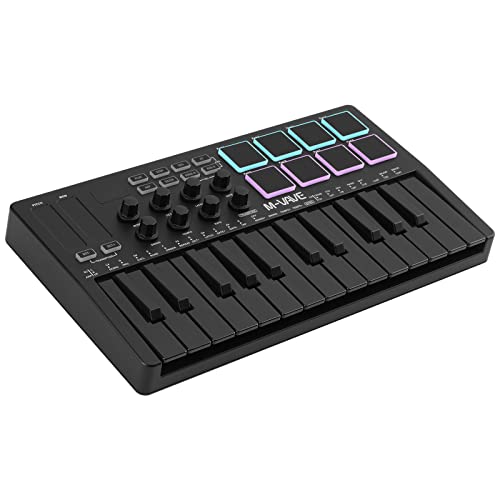 | Best Portability | Number of Pads: 8 pads | Pad Sensitivity: Velocity-sensitive drum pads | Connectivity Type: USB and Bluetooth wireless | VIEW LATEST PRICE | Read Our Analysis |
| Donner STARRYPAD MINI Portable MIDI Drum Controller | 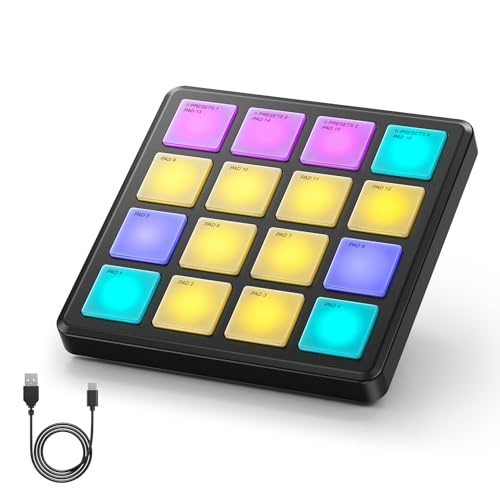 | Ultra-Portable Design | Number of Pads: 16 pads | Pad Sensitivity: Velocity-sensitive pads with polyphonic aftertouch | Connectivity Type: USB-C and wireless MIDI | VIEW LATEST PRICE | Read Our Analysis |
You may be interested


More Details on Our Top Picks
Donner MIDI Pad Beat Maker with 16 Pads
If you’re looking for a versatile and compact MIDI controller that fits perfectly in a home or professional music studio, the Donner MIDI Pad Beat Maker with 16 Pads is an excellent choice. This professional drum machine, known as the STARRYPAD, boasts 16 soft silicone backlit pads that you can customize with seven vibrant colors, enhancing visual feedback during performances. You’ll benefit from adjustable velocity sensitivity, enabling precise control of dynamics, and three pad banks that expand your playable options to 48 assignable pads. Plus, its compact dimensions make it easy to position anywhere, while included software and courses help you kickstart music production effectively.
- Number of Pads:16 pads
- Pad Sensitivity:Velocity-sensitive silicone pads with adjustable velocity curves
- Connectivity Type:USB (class-compliant), MIDI in/out
- Portability/Size:Compact size (5.87D x 8.39W x 1.3H inches)
- Included Software / Content:Music production software (Cubase LE), 40 courses, Melodics
- Special Pad Features:7 color customizable lighting, 3 pad banks (48 assignable pads), tap tempo
- Additional Feature:3 bank switchable pads
- Additional Feature:Tap Tempo synchronization
- Additional Feature:MIDI in/out connectivity
Akai MPK Mini MK3 USB MIDI Keyboard Controller
Designed for emerging producers and seasoned beat makers alike, the Akai MPK Mini MK3 USB MIDI Keyboard Controller excels as a compact yet powerful tool that fits seamlessly into any home or professional music studio setup. You get 25 velocity-sensitive keys, 8 backlit MPC-style pads, and 8 assignable knobs, plus a clever 4-way thumbstick for pitch and modulation control. Featuring a built-in arpeggiator and NKS integration, it lets you control Native Instruments presets directly. Included software, sample packs, and a two-month Splice subscription guarantee you’re equipped for creativity from the start, while customizable controls let you tailor it to your workflow.
- Number of Pads:8 pads
- Pad Sensitivity:Velocity-sensitive MPC-style pads
- Connectivity Type:USB and sustain pedal input
- Portability/Size:Compact and portable
- Included Software / Content:MPC Beats, 3 virtual instruments, 2GB sound content, 2-month Splice subscription
- Special Pad Features:Note Repeat and Full Level, 4-way thumbstick control, arpeggiator
- Additional Feature:4-way thumbstick control
- Additional Feature:NKS instrument integration
- Additional Feature:Two-month Splice subscription
Synido MIDI Pad Beat Maker Controller (64 Pads)
The Synido MIDI Pad Beat Maker Controller, featuring 64 velocity-sensitive RGB pads, offers an extensive solution for musicians who want versatile control and portability in their music production setup. With large, tactile, customizable silicone pads, you can trigger drumming dynamics and MIDI commands seamlessly, whether in Easy Mode or more advanced settings. It connects effortlessly to iPhone, iPad, or Mac, providing USB MIDI compatibility without extra drivers. The device’s four ambient modes and fixed chord mode across four octaves enhance creative possibilities, while its independent power and included shoulder bag make it ideal for on-the-go music creation.
- Number of Pads:64 pads
- Pad Sensitivity:Velocity-sensitive RGB pads with 4 velocity sensitivity levels
- Connectivity Type:USB MIDI output (class-compliant), iPhone/iPad via Lightning or USB
- Portability/Size:Portable with shoulder bag
- Included Software / Content:No specific software included mentioned
- Special Pad Features:8×8 RGB pads, 4 ambient modes, fixed chord mode, Easy Mode
- Additional Feature:Easy Mode visualization
- Additional Feature:Fixed chord mode
- Additional Feature:Includes shoulder bag
Akai MPD218 USB MIDI Controller with Drum Pads
Musicians and producers seeking a compact yet powerful tool for beat creation will find the Akai MPD218 USB MIDI Controller with Drum Pads an excellent addition to their studio setup, as its 16 thick Fat MPC pads deliver highly responsive input for triggering drums, melodic samples, and various effects with precision. This ultra-portable controller connects via USB and offers three assignable pad banks, totaling 48 pads, along with 18 360-degree potentiometers for fine control over your DAW and virtual instruments. Equipped with MPC Note Repeat and Full Level features, it guarantees expressive performances, while included software like Ableton Live Lite and MPC Beats boosts your production capabilities.
- Number of Pads:16 pads
- Pad Sensitivity:Thick velocity-sensitive MPC pads
- Connectivity Type:USB powered
- Portability/Size:Ultra-portable, compact design
- Included Software / Content:Ableton Live Lite, Drum Synth 500, MPC Beats
- Special Pad Features:MPC Note Repeat, Full Level controls
- Additional Feature:MPC Note Repeat function
- Additional Feature:18 assignable potentiometers
- Additional Feature:Powered via USB only
EMP16 MIDI Pad Controller with Bluetooth and OLED
If you’re looking for a versatile MIDI pad controller that combines portability with professional-grade features, the EMP16 stands out as an excellent choice. You get 16 RGB velocity-sensitive pads with 16 customizable colors, expandability through 4 banks to 64 pads, and a lightweight design perfect for studio work or gigs. It connects wirelessly via Bluetooth 5.0 to any compatible iOS or Mac device, no drivers needed, or through USB and standard MIDI ports. Its OLED display offers real-time visual feedback, while assignable faders, buttons, and knobs let you tailor controls precisely. Plus, beginner-friendly Cubase software is included for easy setup.
- Number of Pads:16 pads (expandable to 64)
- Pad Sensitivity:Velocity-sensitive pads with 3 velocity curves and threshold settings
- Connectivity Type:Bluetooth 5.0, USB MIDI, standard MIDI inputs/outputs
- Portability/Size:Lightweight, portable
- Included Software / Content:Cubase LE15 & Cubasis LE3 via included code
- Special Pad Features:16 color customizable lighting, Note Repeat, Time Division, Swing, sequencer, OLED display
- Additional Feature:Bluetooth 5.0 wireless
- Additional Feature:OLED visual feedback
- Additional Feature:Runs on AA batteries
Akai APC Mini MK2 USB MIDI Pad Controller
Designed for producers who crave hands-on control and seamless Ableton Live integration, the Akai APC Mini MK2 USB MIDI Pad Controller offers a compact yet powerful solution for clip launching and mixing in both home studios and live settings. You get 64 RGB pads arranged in an 8×8 matrix, perfect for triggering clips, loops, or samples with precision. Its nine assignable faders, including a master, let you adjust volume, pan, and devices smoothly. Compatible with Mac and PC, it plugs in via USB—no extra power needed. With extra software like Ableton Live Lite and virtual instruments, it elevates creative workflow effortlessly.
- Number of Pads:64 pads
- Pad Sensitivity:RGB velocity-sensitive pads
- Connectivity Type:USB powered
- Portability/Size:Compact and lightweight (8.28D x 9.48W x 1.2H inches)
- Included Software / Content:Ableton Live Lite, Hybrid 3, Mini Grand, Velvet instruments
- Special Pad Features:64 RGB pads, Smart Scale View, drum sample mode
- Additional Feature:1:1 Ableton mapping
- Additional Feature:9 assignable faders
- Additional Feature:Includes hybrid synth pack
Akai MPK Mini MK3 USB MIDI Keyboard Controller
You’ll find the Akai MPK Mini MK3 USB MIDI Keyboard Controller especially valuable if you want a compact yet powerful tool that seamlessly integrates your beat-making and melodic ideas in a home studio setup. Featuring 25 velocity-sensitive keys, 8 backlit MPC-style drum pads with Note Repeat and Full Level, plus 8 assignable knobs, it offers extensive control over your virtual instruments and DAW parameters. The built-in arpeggiator and 4-way thumbstick enhance expressive performance, while NKS integration lets you directly manage Native Instruments presets. USB power and software bundles, including 1500+ sounds and a 60-day Splice plan, complete this versatile package.
- Number of Pads:8 pads
- Pad Sensitivity:Velocity-sensitive MPC-style pads
- Connectivity Type:USB and 1/4″ sustain pedal input
- Portability/Size:Compact and portable
- Included Software / Content:MPC Beats, 3 virtual instruments, NKS bundles, 60 days Splice
- Special Pad Features:Note Repeat, Full Level, NKS Integration
- Additional Feature:MPC Note Repeat feature
- Additional Feature:Custom mapping editor
- Additional Feature:1/4″ sustain pedal input
MIDI Strike Pad Controller with Knobs and Software
Musicians, producers, and DJs who need a compact and highly versatile MIDI controller will find the MIDI Strike Pad Controller with Knobs and Software an exceptional choice, especially since it combines portability with extensive control options. This mini USB-powered controller boasts 48 velocity and pressure-sensitive pads arranged in three RGB-backlit sets of 16, allowing you to program beats, control MIDI parameters, or change programs seamlessly. With 18 user-assignable knobs and dedicated buttons for note repeat and program selection, you get granular control over your sound. Its lightweight, portable design makes it ideal for studio sessions or live performances on the go.
- Number of Pads:48 pads (three sets of 16)
- Pad Sensitivity:Velocity and pressure-sensitive pads
- Connectivity Type:USB 2.0 powered
- Portability/Size:Portable, compact size (7.48D x 7.83W x 1.54H inches)
- Included Software / Content:No software specified
- Special Pad Features:Programmable knobs, program changes, note repeat, full level
- Additional Feature:48 velocity-sensitive pads
- Additional Feature:18 assignable knobs
- Additional Feature:USB 2.0 powered
M-VAVE 25-Key USB MIDI Keyboard Controller (Black)
If you’re seeking a compact, versatile MIDI controller that seamlessly integrates into any music production setup, the M-VAVE 25-Key USB MIDI Keyboard Controller stands out as an exceptional choice. Featuring 25 velocity-sensitive mini keys, eight RGB backlit pads, and eight assignable rotary encoders, it offers precise control over your beats and melodies. The two capacitive touch strips provide smooth pitch bending, enhancing expression. Powered by USB or a built-in 2,000 mAh battery with wireless Bluetooth, it delivers about 16 hours of operation. Compatible across Windows, Mac, and mobile platforms, it suits producers on the go without sacrificing functionality.
- Number of Pads:8 pads
- Pad Sensitivity:Velocity-sensitive drum pads
- Connectivity Type:USB and Bluetooth wireless
- Portability/Size:Ultra-portable, compact
- Included Software / Content:No specific software bundle included
- Special Pad Features:Smart chord and smart sound functions, touch strips for pitch bend
- Additional Feature:Built-in 2,000mAh battery
- Additional Feature:16-hour wireless use
- Additional Feature:Smart chord functions
Donner STARRYPAD MINI Portable MIDI Drum Controller
The Donner STARRYPAD MINI Portable MIDI Drum Controller stands out as an excellent choice for producers and beat makers who prioritize portability without sacrificing functionality, featuring 16 velocity-sensitive RGB pads that respond dynamically to your playing intensity while offering polyphonic aftertouch for nuanced expression. Its ultra-slim design, weighing just 0.19 kilograms, fits comfortably in your pocket or bag, and a built-in rechargeable battery delivers up to 10 hours of wireless use. Compatible with Android, iOS, Mac, and Windows, it connects via USB-C or wireless MIDI, making it perfect for on-the-go studio sessions or live performances.
- Number of Pads:16 pads
- Pad Sensitivity:Velocity-sensitive pads with polyphonic aftertouch
- Connectivity Type:USB-C and wireless MIDI
- Portability/Size:Ultra-slim, pocketable design
- Included Software / Content:No specific software bundle mentioned
- Special Pad Features:Polyphonic aftertouch, Note Repeat, customizable velocity curves, rechargeable battery
- Additional Feature:Polyphonic aftertouch pads
- Additional Feature:Built-in rechargeable battery
- Additional Feature:Wireless MIDI connection
Factors to Consider When Choosing a Beat Maker Pad
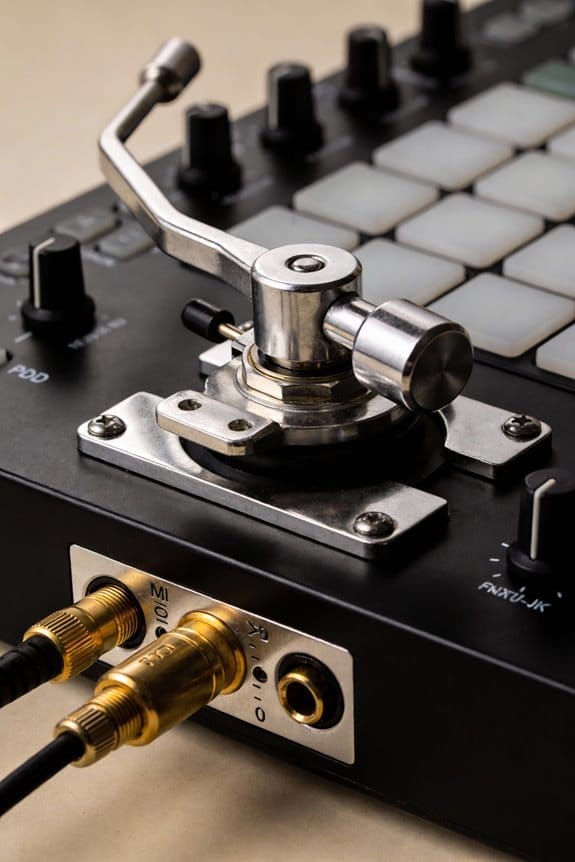
When choosing a beat maker pad, you’ll want to focus on key features like pad sensitivity and response, which affect how accurately your playing translates into sound, as well as the number of pads to match your production style. Connectivity options are essential too, since they determine how easily you can link your pad with other studio gear or computers, while portability and size influence whether you can comfortably carry it around or fit it in limited spaces. Don’t forget to check for included software support, because bundled programs often expand your creative possibilities and streamline your workflow from the start.
Pad Sensitivity and Response
Although pad sensitivity might seem like a simple feature at first glance, it plays an important role in shaping your overall music production experience, as it determines how well your beat maker responds to the nuances of your playing dynamics. Pad sensitivity refers to how responsive a MIDI pad is to varying pressure levels, directly impacting the expression and feel of your beats. Many controllers let you adjust velocity sensitivity curves, so you can tailor response to light taps or heavy hits, enhancing playability. Velocity-sensitive pads let you trigger different samples or effects depending on how hard you strike them, which is vital for dynamic genres like hip-hop. Also, consider pad materials, like silicone or rubber, since they affect comfort and durability, influencing your workflow during long sessions.
Number of Pads
Feeling confident about pad sensitivity and response sets you up well to contemplate how many pads you actually need on your beat maker. The number of pads directly impacts your ability to access multiple sounds and samples simultaneously, with common options ranging from 16 to 64 pads. If you want versatility, more pads allow you to trigger several instruments or layer sounds, boosting your creative potential. Some devices even offer expandable pad banks, reaching 48 or more pads, which is great for extensive beat-making. Beginners might prefer models with fewer pads and “Easy Mode” to avoid feeling overwhelmed. Ultimately, choosing the right number depends on your workflow, whether you prioritize simplicity or want ample room for complex, dynamic performances in your music studio setup.
Connectivity Options Available
Since your beat maker pad acts as a central hub in your music studio setup, choosing the right connectivity options is vital to guarantee smooth integration with various devices and software. Look for USB ports to plug directly into your computer or digital audio workstation (DAW), enabling low-latency, stable connections. Bluetooth support adds wireless convenience, letting you connect to mobile devices without cables, which is handy on the go or in cluttered spaces. MIDI in/out ports are essential if you want to integrate external synthesizers or MIDI controllers, expanding your sound palette and control possibilities. Also, prioritize class-compliant devices requiring minimal drivers to ensure quick plug-and-play across Windows, macOS, Android, or iOS platforms. Checking compatibility prevents frustrating setup issues and keeps your creative workflow seamless and efficient.
Portability and Size
When you’re selecting a beat maker pad for your music studio, portability and size play a critical role in how effortlessly you can create and perform, especially if you frequently move between recording sessions, live gigs, or jam spaces. You’ll want to focus on compact designs that fit snugly in your backpack or, if possible, a pocket, enabling music creation anywhere. Check the device’s weight and build materials; lightweight yet durable pads reduce fatigue during lengthy sessions. Battery life matters too—seek rechargeable models that power several hours without plugging in, so you’re never tied down. Finally, wireless connectivity like Bluetooth, alongside USB, can expand your flexibility, letting you integrate smoothly with different setups and move freely while jamming or recording on the fly.
Included Software Support
In considering a beat maker pad for your music studio, the included software support is an essential factor that can greatly influence your creative workflow and production capabilities. Many controllers come bundled with DAW software, virtual instruments, or expansive sound libraries that immediately enhance your music production options. Some even offer advanced integrations like NKS support, giving you direct access to preset sounds and effects for a streamlined experience. Beyond that, sample libraries and production tools often accompany these pads, which is particularly helpful if you’re just starting out. It’s vital to verify that the bundled software works smoothly with your operating system and preferred DAW. Additionally, accessibility to tutorials, video guides, and responsive customer support can make maneuvering new software far easier, boosting your overall studio productivity.
Customization and Controls
A key aspect to focus on when selecting a beat maker pad is its customization and control features, which directly influence how intuitively and efficiently you can shape your sounds and performances. You’ll want to look for controllers offering assignable knobs and faders, so you can tailor effects and instrument parameters live without interruption. Devices with multiple banks of pads let you access more sounds without toggling modes, streamlining your workflow. The ability to manually map controls using downloadable editors means you can create setups perfectly suited to your style. Additionally, customizable velocity curves guarantee your playing dynamics feel natural and responsive. Features like Note Repeat and Full Level add creative depth, letting you produce complex rhythms and expressive beats without hassle.
Power Supply Types
Beyond customization and control features, considering how your beat maker pad is powered plays a significant role in determining its practicality and convenience, especially depending on where and how you plan to use it. Many pads operate via USB connectivity, allowing for plug-and-play setup and continuous power during long studio sessions without worrying about battery life. Others come with internal batteries that provide portability, offering between 10 to 16 hours of use per charge, ideal for on-the-go creativity. Some models feature dual power options, letting you switch seamlessly between battery and USB power. Additionally, certain controllers offer wireless Bluetooth connectivity, eliminating cables while maintaining performance flexibility. Understanding these power supply types helps you select a pad that matches your workflow, balancing mobility with uninterrupted, reliable operation.
Compatibility With Devices
When choosing a beat maker pad, you’ll want to carefully evaluate its compatibility with your existing devices and software to guarantee a smooth workflow without annoying connectivity issues or driver installations. First, check if the pad features USB connectivity, ensuring it works with Windows, Mac, and even mobile platforms. Bluetooth is a great bonus, offering wireless freedom, especially for iOS users. Opt for class-compliant devices that require no extra drivers, simplifying plug-and-play use. Also, confirm seamless integration with your preferred digital audio workstation (DAW), which is vital for sound editing and production. Finally, verify the presence of MIDI in/out ports to connect external synths or other MIDI gear, expanding your creative options and ensuring your setup grows as you do.
Frequently Asked Questions
Can I Use These Beat Maker Pads With Ios Devices?
Yes, you can use most beat maker pads with iOS devices, especially those that support USB or Bluetooth MIDI connections. Many popular models offer class-compliant drivers, meaning they work seamlessly without extra software on iPhones or iPads. Just verify your pad supports MIDI over USB or Bluetooth Low Energy and that you have the right adapter, like Apple’s Lightning to USB Camera Adapter. This setup lets you create beats on your iOS gear smoothly.
Do These Controllers Come With Built-In Sound Libraries?
Yes, many controllers come with built-in sound libraries, including drum kits, synth samples, and effects, which let you start crafting beats right away. However, the quality and size of these libraries vary widely depending on the model and brand—some offer extensive, genre-specific sounds, while others focus more on hardware features, expecting you to add software libraries. You’ll want to check compatibility with your preferred digital audio workstation for seamless integration.
What Software Compatibility Do These MIDI Controllers Offer?
You know the saying, “The proof is in the pudding,” and that applies here—these MIDI controllers typically offer broad software compatibility, including major DAWs like Ableton Live, FL Studio, and Logic Pro. They use standard MIDI protocols, ensuring seamless integration with virtual instruments and plugins. While some come pre-mapped for popular software, most allow customizable MIDI mapping, letting you fine-tune controls to your workflow, whether you’re producing beats, remixing tracks, or performing live.
Are These Beat Maker Pads Suitable for Live Performances?
Yes, these beat maker pads are definitely suitable for live performances, as they combine responsiveness and durability, critical for energetic stage use. Many feature velocity-sensitive pads, allowing you to control dynamics expressively, while some come with customizable bank options for quick access to sounds. Their compact design fits easily into live setups, and low latency guarantees your beats sync perfectly with other instruments. While not all models suit every style, most handle live environments well.
Can These Devices Be Powered via USB Only, Without Adapters?
Yes, most beat maker pads can be powered solely via USB without needing external adapters, which makes them highly portable and convenient for studio or live use. USB power typically supplies enough current to operate the device while transferring data simultaneously, but some high-end models might require additional power for advanced features. Always check your specific model’s power requirements, as this can vary based on the number of pads, lights, and onboard processing capabilities.


